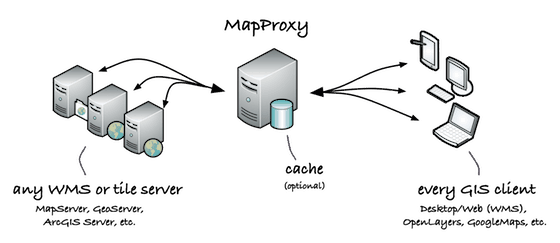
MapProxy is an open source proxy for geospatial data. It caches, accelerates and transforms data from existing map servers. Unlike other solutions, the OGC WMS standard remains on client and server-side.

It is a middle-man between existing web map servers (like MapServer or GeoServer) and clients. All existing web and desktop GIS applications can be used, but also modern clients like OpenLayers and GoogleEarth.

mapproxy

Features of MapProxy

MapProxy acts as a WMS, TMS and KML server. It does not render any data itself but delegates requests to other server. It stores all responses and reuses that cached data for further requests. It can requests data from WMS and TMS clients.

MapProxy supports:

MapProxy can:

  • accelerate existing WMS
  • reproject to other SRS (i.e. cache in EPSG:4326, requests in EPSG:31467)
  • combine individual map layers from different WMS services
  • hide the origin WMS servers
  • fill caches dynamic, in advance or both
  • add watermarks and/or attributions to all responses

Demo

Below is an OpenLayers client that shows an OpenStreetMap WMS behind a MapProxy installation. For a full-screen demo visit: osm.omniscale.de

Project Status

MapProxy is actively developed and supported by Omniscale and is released under the GNU AGPL License 3.0. The project started late 2008 and became Open Source in March 2010. The project is looking for developers and users.

Getting started

Requirements

MapProxy is written in Python and runs on all major platforms (Unix/Linux/Mac/Windows). Refer to the documentation for installation instructions.

Support

If you need help setting up MapProxy, having some trouble or found a bug? Join our mailing list to get help. You can report bugs on our issue tracker.

You can also get commercial support from Omniscale.

Documentation

You find the documentation, tutorials and some configuration examples here.

Mailing List

The OSGeo is hosting our mailing list: mapproxy@nolists.osgeo.org

The list is for users and developers. Subscribe or go to the archive.

Development

Source

MapProxy releases are available from the the Python Package Index (PyPI). You can go to the PyPI page of MapProxy to see the latest release. There is also listing of all releases.

The source repository is available at BitBucket. If you want to fix a bug, or start hacking at MapProxy consider creating a "fork".

API Documentation

You find the api documentation here. This documentation is intended for MapProxy developers only. MapProxy is not meant to be a library, and the API might change. If you want to reuse parts of MapProxy please join our mailing list. We are planing to move some parts of MapProxy into external libraries, with a stable API and MIT-license, but we need your feedback.